Claude plugins vs skills
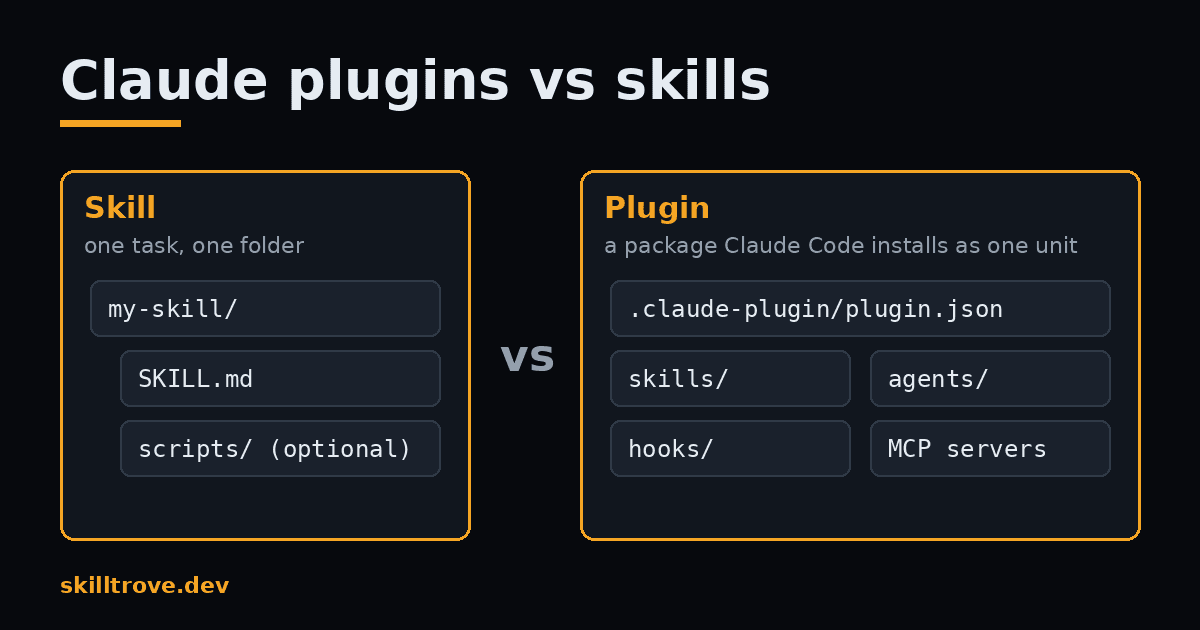
Claude plugins vs skills is a question of size. A skill teaches Claude one task, and a plugin packages many parts so you can install them together.
TL;DR: Start with a skill when you need one repeatable task. Move to a plugin when you want to share several skills, subagents, hooks or MCP servers as one install.
What is a Claude skill?
A skill is a folder with a SKILL.md file inside. The file has a short YAML header and a set of instructions.
Claude reads each skill's description at the start of a session. The full instructions load only when a task needs them, or when you type /skill-name. That keeps your context window lean.
You can keep a personal skill in ~/.claude/skills/ so it works in every project. A project skill lives in .claude/skills/ and travels with the repo. Skills follow the open Agent Skills format, so the same folder also works in other agents. The Claude Code skills docs list every frontmatter field.
What is a Claude plugin?
A plugin is a directory that Claude Code installs and loads as one unit. It can hold skills, subagents, hooks, MCP servers and other parts.
Every plugin has a manifest at .claude-plugin/plugin.json. You install plugins from a marketplace, which is a repo with a .claude-plugin/marketplace.json file. Run /plugin and open the Discover tab to browse them.
Anthropic's plugin docs say it plainly. Skills, subagents, hooks and MCP servers all work on their own, without a plugin. A plugin is the box, not the thing inside it.
What is the difference between Claude plugins and skills?
The difference is scope. A skill is one capability. A plugin is a shipping format that can carry many capabilities at once.
| Question | Skill | Plugin |
|---|---|---|
| What is it? | One folder with a SKILL.md file | A directory with a plugin.json manifest |
| What can it hold? | Instructions, plus optional scripts and reference files | Skills, subagents, hooks, MCP servers |
| How do you install it? | Copy the folder into a skills directory | /plugin install name@marketplace |
| How do you call it? | /skill-name | /plugin-name:skill-name |
| Can it run code? | Only scripts the skill tells Claude to run | Yes, hooks and MCP servers run with your user privileges |
One detail trips people up. Plugin skills get a namespace. A skill called review inside a plugin called tools becomes /tools:review. That stops two plugins from clashing over the same name.
When should I use a skill instead of a plugin?
Use a plain skill when you have one task and no extra moving parts. Most teams should start here.
A skill is faster to write and easier to read. You can test it in minutes. If it works, you can commit it to .claude/skills/ and your team gets it on the next pull.
Anthropic's skill-creator skill can draft one for you. Our guide to creating a skill walks through the folder layout step by step.
When is a plugin the better choice?
Pick a plugin when several parts must arrive together. A plugin also makes sense when you want users to get updates from one place.
Superpowers by obra is a good real example. It ships a set of coding workflow skills plus hooks as one plugin. You install it with /plugin install superpowers@claude-plugins-official, and every skill lands at once. The source is public on GitHub.
Anthropic does the same with its own skills repo. You can add anthropics/skills as a marketplace, then install the document-skills or example-skills plugin. See every skill they publish on the Anthropic author page.
Do plugins use more context than skills?
Not by much. When a plugin is enabled, Claude sees the name and description of each skill, agent and command it holds. The full text loads only when Claude uses one.
So the cost grows with the number of parts, not with the plugin itself. A plugin with forty skills adds forty short descriptions to every turn. If you only need two of them, copying those two skills may be leaner.
Before you install a big bundle, look at what each skill does on its own. The fastest way is to browse them one by one and keep only the ones you will use.
Browse Claude Code skills on SkillTrove
Is a plugin safe to install?
Treat it like any software you run. A plugin can include hooks and MCP servers, and those run code with your user privileges.
Read the plugin.json and the hooks before you install. Prefer plugins from authors you know, and check that the source repo is public. Skills carry less risk, since they are mostly text you can read in one sitting. If you want to know which plugins are popular, our Claude Code plugins hub tracks marketplaces and install commands.
FAQ
Are Claude plugins the same as skills?
No. A skill is one SKILL.md folder that teaches Claude a task. A plugin is a package that can contain skills, plus subagents, hooks and MCP servers. Many plugins are mostly skills, which is why people mix the two up. You can use any skill without a plugin.
Can a Claude plugin contain skills?
Yes. A plugin keeps its skills in a skills folder, one SKILL.md per skill. After you install the plugin, each skill shows up with the plugin name in front, like /plugin-name:skill-name. Claude can also pick those skills up on its own when a task matches.
Should I build a skill or a plugin first?
Build a skill first. It is smaller, easier to test and easy to share by committing it to your repo. Wrap it in a plugin later if you add hooks, subagents or MCP servers, or if you want people to install and update it from a marketplace.
How do I install a Claude Code plugin?
Run /plugin in Claude Code and open the Discover tab. Pick a plugin and choose a scope: user for all your projects, project to share with your team, or local for just you in one repo. You can also run /plugin install name@marketplace directly.