VSCode Agent Skills
VSCode agent skills are folders with a SKILL.md file that GitHub Copilot in VS Code loads when a task needs them. Each one teaches Copilot a job, like testing a web app or tracking down a bug.
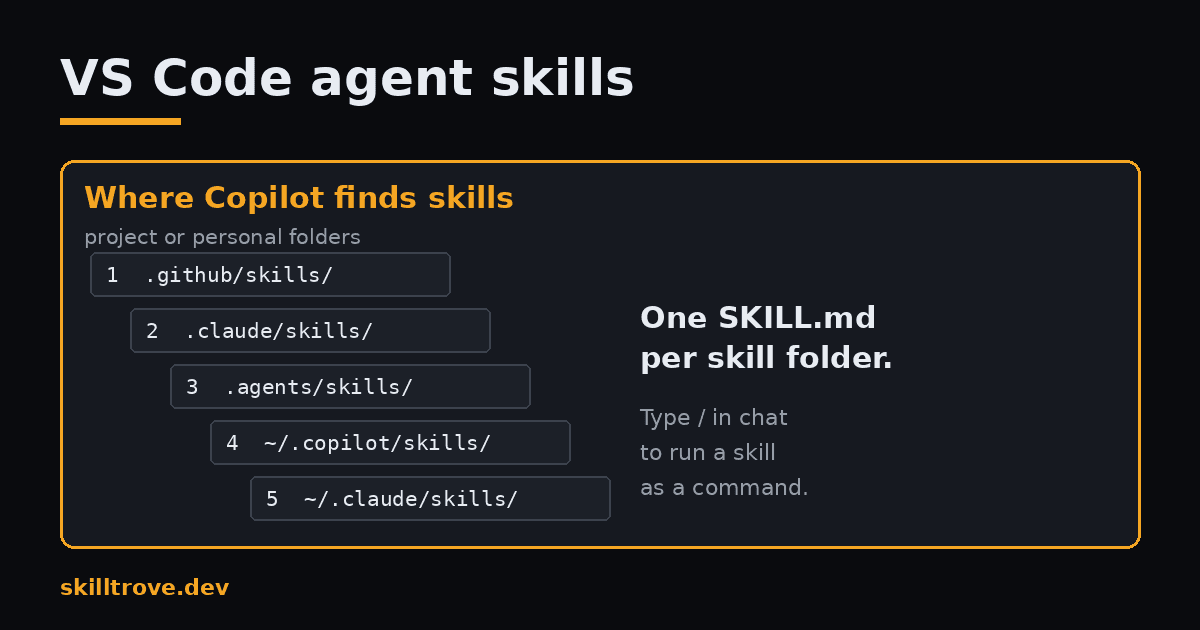
Put a skill folder in .github/skills, .claude/skills or .agents/skills in your repo, then type / in chat to run it by name.
What Are Agent Skills In VS Code?
Each skill holds a SKILL.md file and can add scripts, templates and examples in the same folder.
VS Code follows the open Agent Skills standard. Microsoft's VS Code agent skills docs say the same skill works in Copilot in VS Code, Copilot CLI, the Copilot app and Copilot cloud agent. Many skills written for Claude Code also work as is, since they use the same format. Kiro follows the same standard, so a skill you write here can also go in Kiro's skills folder.
Skills are not the same as custom instructions. Instructions, like .github/copilot-instructions.md, apply to every chat and set coding rules. Skills load only for the task they describe, and they can carry files.
Where Does VS Code Look For Skills?
VS Code checks six folders. Three live in your repo and three live in your home folder.
| Skill type | Folders |
|---|---|
| Project skills (shared with your team) | .github/skills/, .claude/skills/, .agents/skills/ |
| Personal skills (every project) | ~/.copilot/skills/, ~/.claude/skills/, ~/.agents/skills/ |
Each skill gets its own folder, and the folder name must match the name field in SKILL.md. Use lowercase letters, numbers and hyphens only. The docs warn that a bad name makes the skill fail to load with no error. Zed has a rule like this too, since it only finds a skill that sits right inside the skills folder, as our Zed setup guide explains.
If you also use Claude Code or Codex, our skill folder guide lists the path each tool reads. Google Antigravity reads .agents/skills as well, so a repo that keeps skills there also works in Antigravity.
How Do I Add A Skill To Copilot In VS Code?
Copy the skill folder into one of the folders above. That is all most skills need.
To start from scratch, open the Chat view and choose Open Customizations, then Skills.
Select New Skill, pick a location and give it a name. VS Code creates the SKILL.md file for you to fill in.
A SKILL.md file starts with two required fields:
---
name: webapp-testing
description: Test local web apps with Playwright. Use when asked to check a page or debug the UI.
---
The description matters most. Copilot reads it to decide when the skill fits, so name the task and the words people use for it.
How Does Copilot Decide When To Use A Skill?
It loads skills in three steps, so unused skills cost almost nothing.
- First, Copilot reads only the name and description of each skill.
- Next, when your request matches, it loads the SKILL.md body.
- Last, it opens extra files in the folder only when the steps point to them.
This is why you can install many skills at once. A file that SKILL.md never links to never loads, so link your templates and scripts by relative path.
How Do I Run A Skill As A Slash Command?
Type / in the chat box. Skills show up in the list next to your prompt files.
You can add details after the name, such as /webapp-testing for the login page. Two optional fields control access:
- user-invocable: false hides the skill from the / menu, but Copilot can still load it.
- disable-model-invocation: true stops automatic loading, so it runs only when you type it.
Which Skills Should I Try First In VS Code?
Start with skills that fix jobs you repeat every week. These come from the SkillTrove catalog and use the standard SKILL.md format.
- Anthropic's skill-creator helps you write and test your own skills. It can run evals and tune a description so the skill triggers at the right time.
- Jesse Vincent's systematic-debugging makes the agent find the root cause before it proposes a fix. It is MIT licensed.
- Our testing category lists more skills for unit tests, test plans and test-first work.
Read each SKILL.md before you install it. Skills can tell the agent to run scripts, and VS Code's terminal approval settings decide what runs without asking.
What Is A Good First Skill For A Web Project?
A testing skill pays off fastest, since every change needs a check. The VS Code docs even use a Playwright testing skill as their main example.
Anthropic's webapp-testing skill does that job, using Playwright to test local web apps, check front-end features, take screenshots and read browser logs.
Its folder sits in Anthropic's GitHub repo, and the license is Apache 2.0. Copy it into .github/skills and ask Copilot to test a page.
View the webapp-testing skill by Anthropic
FAQ
What Is The Difference Between Copilot Instructions And Skills?
Use instructions for standards your whole project follows, like coding style or commit message format. Use a skill for a repeatable job, like running tests, debugging a failed build or creating a release.
Can I Use Claude Skills In VS Code?
Yes, in most cases. Claude skills use the same SKILL.md format, and VS Code reads .claude/skills in your repo and ~/.claude/skills in your home folder.
Before you copy one over, make sure any scripts it runs are allowed by your terminal settings.
Why Is My Skill Not Showing Up In VS Code?
The most common cause is a name problem, so check the name rules above first.
Also check that the folder sits in a supported location and that SKILL.md has a description. Then type / in chat or open the Skills page to confirm it loaded.